
For JSM agents
Use Jira’s native agent queue
JSM Cloud already supports bulk approval from an agent’s Requires my approval service-project queue. No Marketplace app is needed for that workflow.
Read Atlassian’s native bulk approval instructions
Approval Queue for JSM
Jira Service Management Cloud
Have several requests waiting for your approval? See them together in the Jira Service Management customer portal. Review each request, choose up to 25, and approve or decline them in one go. You stay in control.
Available nowAvailable on Atlassian Marketplace
Your Jira site administrator installs Queue; customer-portal approvers use their existing JSM account and permissions. Atlassian currently offers a 30-day Cloud trial. If you continue, billing is through Atlassian; check Marketplace Pricing for your site’s current price and billing terms.
See it in action
See the approval workflow in about 50 seconds: review useful context, choose requests, confirm the batch and check each result. Recorded with fictional example requests.
Several Jira Service Management requests need your decision. Opening each one separately adds repetitive work.
Approval Queue brings your pending approvals into one portal view, with useful request details and context chosen by your administrator.
Choose the requests you have reviewed. Select up to twenty-five, then approve or decline them together.
Check the exact requests before you confirm. You are in control.
After submitting, see the result for each request. Jira's approval rules still apply. Your decision may be one of several needed.
Less repetitive review. Clear decisions. Explore Approval Queue on Atlassian Marketplace.
The recording shows the same three example requests being selected, confirmed and reconciled. Existing Jira approval rules still apply; an individual decision may be one of several needed to complete a workflow.
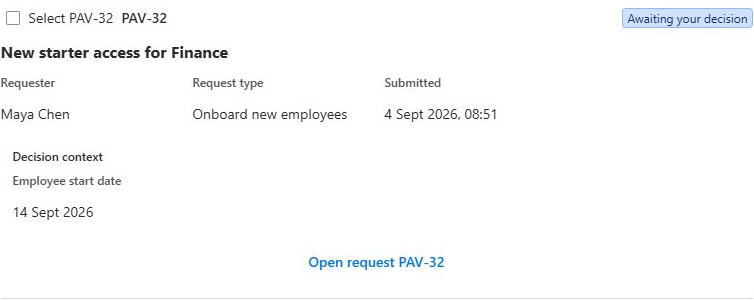
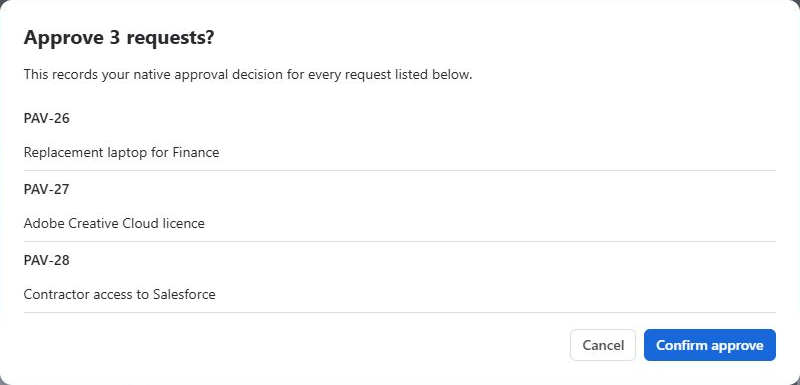
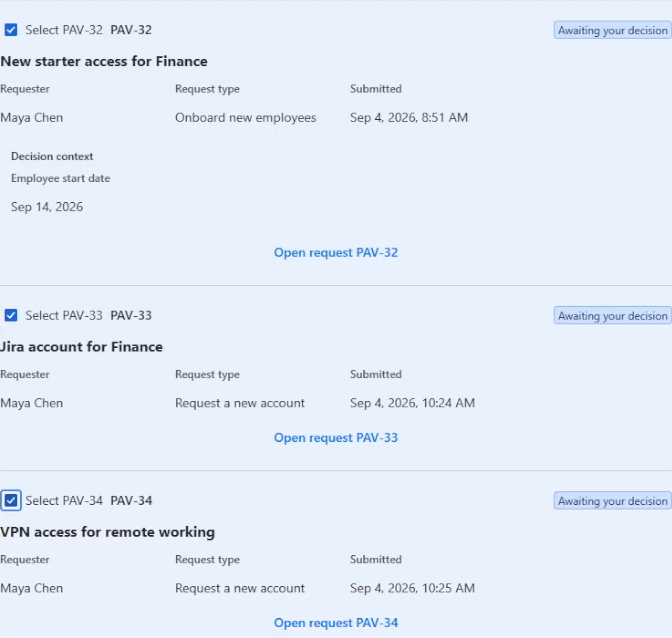
The screenshots use the earlier Bulk Approvals branding; the demo uses Approval Queue branding. The installed portal menu is still called Bulk Approvals. Screenshots show separate synthetic examples, not additional steps from the recorded batch. Select an image to inspect its original size.
Bulk approvals without replacing JSM approvals. Review your pending requests together, check the details and choose what to do. You do not have to open every request just to find the next one.
Open Bulk Approvals from the portal user menu. Search by request key, summary or requester and review the permitted details and configured context fields.
Choose up to 25 requests you have reviewed. Select Approve or Decline, check the exact requests in the confirmation and then submit your decision.
See which Jira decisions were recorded. Stale, failed, unattempted or uncertain results remain distinct; Jira’s refreshed state is authoritative.
For JSM agents
JSM Cloud already supports bulk approval from an agent’s Requires my approval service-project queue. No Marketplace app is needed for that workflow.
Read Atlassian’s native bulk approval instructionsFor customer-portal approvers
People approving through the customer portal use a different view. Queue brings the native requests awaiting their own decision into one focused, selectable batch without changing Jira’s approval rules.
Compare the options in our JSM Cloud guideFor a purchasing request, your team might choose Cost, Supplier or Department. These are examples of supported, administrator-configured context—not guaranteed built-in fields. The original request is still one click away.
You choose the requests and confirm before anything is submitted. There is a maximum of 25 approvals per batch.
Jira remains responsible for visibility, permissions, workflow rules and audit history. Each request is handled independently. Uncertain outcomes are not blindly retried, and your decision may be one of several needed to complete the workflow.
Approval Queue is built on Atlassian Forge. Review its current Marketplace privacy and security information, app permissions and support policy before installation.
Your Jira site administrator installs the app. Approvers use their existing JSM customer-portal account and need the native permission to view and decide on each request. The installed menu item is still Bulk Approvals.
Not a site admin? Choose the Marketplace request-app option and ask your Jira site administrator to install Queue.
Yes. JSM Cloud agents can bulk approve from the native Requires my approval queue. Queue addresses the different customer-portal approver workflow. See our comparison guide for the appropriate native option.
Project administrators can choose up to three eligible fields per request type. Unsupported or inaccessible fields are not replaced with guessed values. See the setup guide.
No. You select the requests and confirm your chosen action. Existing multi-approver requirements still apply.
Results are shown per request. Recorded decisions remain distinct from stale, failed, unattempted or uncertain results. Check the refreshed Jira state before taking further action; uncertain writes are not blindly retried.
Approval Queue is a paid Atlassian Marketplace app with an evaluation option. Your Jira site administrator should check the current Marketplace pricing and evaluation terms for your site before installation. This is not an advertised permanent Free edition.
PezTech Software does not operate an external backend or database containing your Jira request or approval data. The app uses Atlassian Forge. See the existing Privacy Notice and security information for the full details.
For the current site price and evaluation options, review the Marketplace Pricing tab.
For the difference between the agent queue and the portal approver workflow, read our JSM Cloud bulk approvals guide.
Questions? Email support@peztechsoftware.co.uk. Support is available Monday–Friday, 09:00–17:00 UK time; PezTech targets an initial response within two business days. See the Support Policy for full targets.